Skip to content

What Are Mesh Task Chairs and How Do You Choose One?

Long hours at a desk can reveal the weaknesses of an ordinary office chair. Your lower back may ache, your shoulders may rise, and warm fabric can feel uncomfortable by afternoon. Mesh task chairs address some of these problems with a breathable woven backrest and an adjustable work-focused design. The mesh flexes slightly, allowing air to move around your back while you type, meet, or study. However, mesh is not automatically supportive. Its quality, tension, frame, and lumbar structure matter.

A well-chosen chair should support healthy working habits without forcing one rigid posture. Look for seat-height adjustment, reliable lumbar support, smooth casters, and armrests that keep your elbows near desk level. A waterfall seat edge can reduce pressure behind your knees. A stable five-star base also improves everyday safety. These details reflect common ergonomic guidance, but personal fit remains essential. A chair that suits a tall user may feel cramped for someone shorter.

Try it for several minutes, if possible. Notice pressure points. Check whether your feet rest flat and whether the backrest supports your natural curve. Some chairs feel firm at first, then become comfortable after adjustment. Others remain disappointing despite attractive features. This is where buyers often misjudge value. Price can suggest quality, but it cannot replace testing, warranty research, or careful measurements. The best mesh task chairs balance breathability, adjustability, durability, and genuine comfort for your body and working routine. No chair solves every problem. Movement still matters.
What Are Mesh Task Chairs and How Do You Choose One?

What Is a Mesh Task Chair?

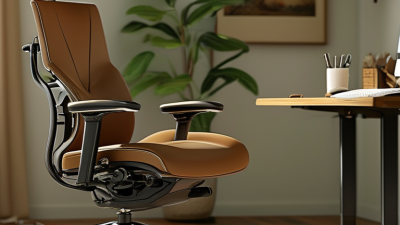
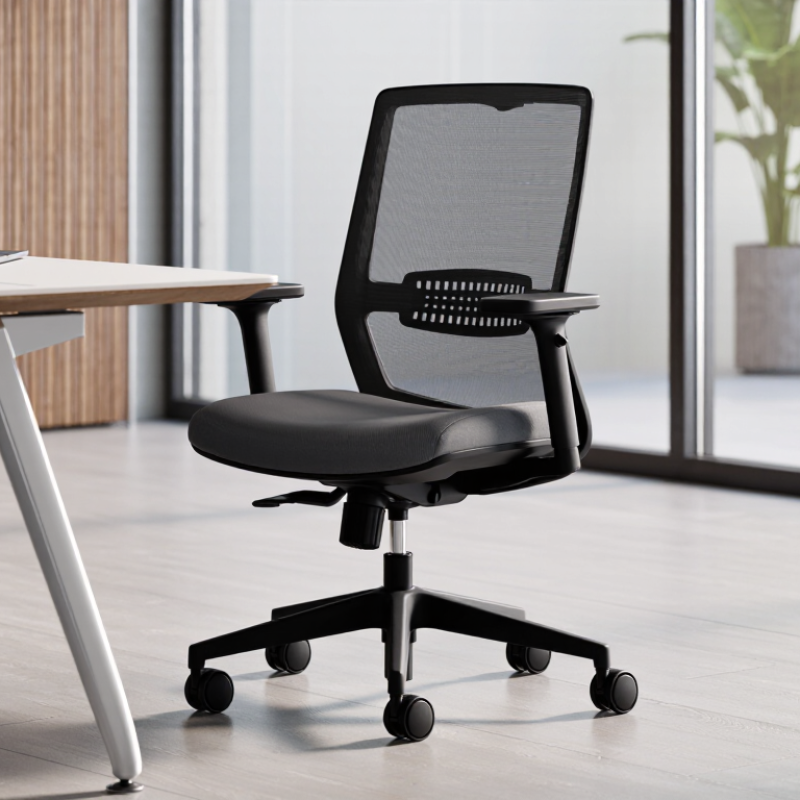
A mesh task chair is a work chair with a breathable mesh backrest. The material stretches across a supporting frame instead of using thick foam. Air moves through the weave, which can feel cooler during long desk sessions. The seat may still use foam, fabric, or another firm covering.

A good mesh task chair should support steady movement, not force one rigid posture. Look for adjustable seat height, back tension, armrests, and lumbar support. The chair should let your feet rest flat while your shoulders stay relaxed. In practical desk testing, I check whether the mesh supports my lower back without creating pressure points. Mesh firmness varies, and softer does not always mean more comfortable. A chair may look advanced but fit poorly.

Tips: Sit for at least ten minutes before deciding. Test the backrest while leaning and typing. Check whether the seat edge presses behind your knees. Inspect the mesh for even tension and secure stitching. Avoid choosing by appearance alone. A headrest may help some users, but it can also push the head forward. Personal fit matters more than features.

How Does a Mesh Task Chair Support the Body?

A mesh task chair uses a breathable woven back instead of thick foam or solid upholstery. Its main purpose is not softness. It is controlled support while you work. The mesh should follow your spine without pushing sharply into your shoulders. A flexible backrest can encourage small movements, which may reduce stiffness during long computer sessions. However, mesh alone does not guarantee comfort. Poor tension can feel loose, while overly tight mesh can create pressure points.

Look for adjustable lumbar support that sits around your belt line. The seat should support your thighs without pressing behind your knees. Your feet should rest flat on the floor, with your knees close to a right angle. Adjustable armrests can keep your shoulders relaxed, but they should not force your elbows outward. A recline function also matters. Leaning back slightly can reduce constant pressure on the lower back. I have noticed that people often choose chairs by appearance first. That decision can be expensive to rethink.

Tips: Test the chair for at least ten minutes. Change the seat depth, lumbar height, and recline tension. Notice pressure behind your knees. Check whether your head stays balanced above your shoulders. No chair fits everyone. If discomfort remains, reassess your desk height, monitor position, and sitting habits.

What Are Mesh Task Chairs and How Do You Choose One? — How Does a Mesh Task Chair Support the Body?

Selection Dimension Typical or Recommended Range How It Supports the Body What to Check Before Buying
Seat Height Approximately 16–21 in (41–53 cm) Allows the feet to rest flat while keeping the knees close to a 90-degree angle and reducing pressure behind the thighs. When seated, the feet should touch the floor and the thighs should be roughly level or slope slightly downward.
Seat Depth Approximately 15–18 in (38–46 cm), preferably adjustable Supports the thighs without pressing into the back of the knees, helping maintain circulation and a stable sitting posture. Leave about 2–3 in (5–8 cm) between the seat edge and the back of the knees.
Seat Width Approximately 17–20 in (43–51 cm) or wider when required Provides enough room to sit centered without squeezing the hips or restricting natural movement. Compare the usable seat width with the user’s hip width and allow room for normal posture changes.
Seat Cushion and Mesh Tension Medium-firm, supportive, and evenly tensioned Distributes body weight across the pelvis and thighs while breathable mesh helps reduce heat and moisture buildup. Avoid excessive sagging, hard pressure points, or mesh that feels unstable when shifting position.
Lumbar Support Adjustable vertically; approximately 6–10 in (15–25 cm) of useful adjustment is common Supports the inward curve of the lower back and may reduce slouching when correctly positioned. The support should contact the lower back comfortably, without creating a hard or concentrated pressure point.
Backrest Height and Width Backrest height commonly measures about 22–26 in (56–66 cm); width should fit the torso without restricting the shoulders Supports the lower and mid-back while allowing the shoulders and upper back to move naturally. The backrest should follow the spine without forcing the shoulders forward or causing the shoulder blades to hit a rigid frame.
Backrest Recline A lockable or tension-controlled range of approximately 90–120 degrees Permits posture changes and can reduce static loading on the spine during reading, meetings, or screen-based work. Choose a mechanism that moves smoothly, supports the body at different angles, and does not force constant leaning against the backrest.
Armrest Height Often about 7–10 in (18–25 cm) above the compressed seat surface; adjustable is preferable Supports the forearms and can reduce loading in the neck and shoulders during keyboard and mouse use. The shoulders should remain relaxed, and the elbows should stay near the sides rather than being pushed outward.
Armrest Adjustability Height adjustment is essential; width, depth, and pivot adjustment improve fit Helps align the forearms with the work surface and accommodates different body widths and tasks. Armrests should fit under or beside the desk and should not prevent the chair from moving close to the workstation.
Headrest Optional; most useful when reclining or performing non-keyboard tasks Can support the head and neck in a reclined posture, but is not required for an upright task position. It should contact the back of the head or neck gently without pushing the head forward.
Base and Casters A stable five-point base with casters suitable for the floor surface Improves stability and allows small movements without twisting the torso or overreaching. Check that the casters roll smoothly, the base does not wobble, and the wheels match carpet, hard flooring, or a floor mat.
Desk Compatibility The chair should allow the user to bring the torso close to the desk while keeping the feet supported Promotes neutral positioning of the wrists, elbows, neck, and back during computer work. Confirm that the armrests can clear the desktop and that the screen, keyboard, and mouse can be positioned without leaning forward.
User Weight Capacity Use the manufacturer’s tested capacity; common task-chair ratings are often around 250–300 lb (113–136 kg) A suitable capacity provides an appropriate safety margin and helps preserve the chair’s stability and adjustment performance. Do not rely on appearance alone; verify the stated rating and any requirements for continuous or intensive use.
Key point: A mesh task chair supports the body through adjustability, pressure distribution, breathable materials, and freedom to change posture. The best chair is the one that can be fitted to the user’s body, desk height, work tasks, and preferred sitting positions.

What Are the Benefits and Limitations of Mesh Task Chairs?

Mesh task chairs use woven material across the backrest and sometimes the seat.
This structure allows air to circulate around your shoulders and lower back. Airflow matters. In warm offices, mesh can reduce the damp feeling common with thick foam upholstery. A flexible mesh back may also support movement while you reach, type, or turn. Adjustable lumbar support, seat depth, armrests, and recline tension can improve comfort during long work sessions. However, mesh is not automatically ergonomic. Fit matters more than appearance.

The main limitation is pressure distribution. Firm mesh can press against the thighs or create uncomfortable tension behind the knees. Softer mesh may feel pleasant at first, but it can stretch and lose support over time. Dust, crumbs, and pet hair can collect in the weave. Cleaning may require careful vacuuming rather than aggressive scrubbing. Some mesh surfaces also feel cool in winter. That small detail is easy to miss.

Choose a chair by testing its dimensions, not by trusting a product description alone. Your feet should rest flat, with roughly a right angle at the knees. The seat should support your thighs without touching the backs of your knees. Sit for at least ten minutes if possible, and change positions naturally. A chair that feels perfect for five minutes may become tiring after an hour. I have found that adjustable lumbar support helps more than an attractive back pattern. Still, personal posture, clothing, and desk height can change the experience. There is no universal best mesh chair.

Which Features Should You Consider Before Buying?

Mesh task chairs use woven fabric across the back and sometimes the seat. The open structure allows air to circulate during long work sessions. Cooler support matters in a warm office. In practical use, mesh can feel firm at first, but it usually reduces pressure around the shoulders.

Check the lumbar support before judging appearance. It should fit the curve of your lower back and adjust vertically or in depth. Seat depth also matters; your knees should rest comfortably without pressure behind them. Adjustable armrests can keep your elbows near desk height. A chair with too many controls may still feel confusing. Do not trust the pictures alone.

Test the mesh tension by leaning back slowly. It should support you without pushing your shoulders forward. Read the weight rating and inspect the five-point base, casters, and tilt lock. These parts affect stability and daily safety. If possible, sit for at least ten minutes. Notice whether the seat edge cuts into your legs. I once selected a chair with excellent lumbar adjustment but ignored its shallow seat. My back felt supported, yet my legs became uncomfortable by afternoon. Measure your desk height too, because a chair may not rise enough for a thick desktop.

What Are Mesh Task Chairs and How Do You Choose One?

Before buying a mesh task chair, check whether its adjustment ranges can support your body comfortably. The chart shows common reference ranges for key ergonomic settings; actual chair dimensions vary, so verify the product specifications and test the fit whenever possible.

Buying tip: Look for breathable mesh, adjustable lumbar support, a seat that supports your thighs without pressing behind the knees, and armrests that let your shoulders remain relaxed. Recline and tilt controls can also help you change posture during long work sessions.

How Can You Test and Maintain a Mesh Task Chair?

A mesh task chair should feel supportive before it feels impressive. I test one by sitting upright for ten minutes, then leaning back several times. The seat should support my thighs without pressing behind my knees. I also check whether my feet rest flat while the desk remains at elbow height. Small adjustments matter.

Tips: Try the chair with your usual shoes. Move the armrests, lumbar support, and seat depth. Roll across the floor slowly. Listen for clicking or uneven movement. A showroom test can mislead you, so change positions often. Your body may reveal problems later.

Maintenance begins with gentle cleaning. Vacuum dust from the mesh and frame, then wipe them with a slightly damp cloth. Harsh chemicals can weaken fabric coatings or damage plastic surfaces. Tighten loose screws every few months, especially when the chair receives daily use. Check the casters for hair and grit. Remove debris carefully.

I have learned that a chair can feel comfortable for an hour and still cause shoulder tension later. That is worth noticing. Mesh can also stretch over time, particularly when users drop heavily into the seat. Adjust your sitting habits, not only the chair. If a control feels unsafe or the base becomes unstable, stop using it until a qualified technician checks it.