Skip to content

What Are the Best Training Room Tables in 2026?

Choosing training room tables in 2026 means looking beyond appearance. The right choice depends on how people learn, how often rooms change, and what the available space can support. A table that works for a laptop-based workshop may feel cramped during group exercises. Small details matter.

This guide compares practical features that shape everyday use: tabletop size, height, mobility, stability, storage, and material durability. It also considers room layouts, from rows for instruction to clusters for discussion. Check product dimensions and weight limits against your actual equipment and floor plan; catalog photos rarely show the full picture. Not always. A caster can make rearranging easier, for example, but a poorly secured table may shift during writing. Folding models save storage space, yet their hinges and locks deserve careful inspection.

There is no universal winner. Budget, maintenance needs, accessibility, and the age of the people using the room can change the best fit. Weigh product specifications against independent reviews and, where possible, test a sample in the room before ordering several units. That step can reveal awkward legroom or noisy wheels that a listing does not mention. Even a careful comparison has limits: user experiences vary, and specifications may change between models. Use this guide to narrow the options and ask better questions before investing in training room tables.
What Are the Best Training Room Tables in 2026?

What Training Room Tables Are and How They Support Learning

What Are the Best Training Room Tables in 2026?

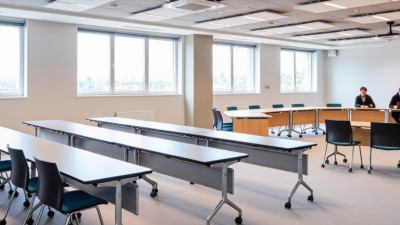
Training room tables are work surfaces designed for classes, workshops, and group instruction. Unlike fixed classroom desks, many can be moved or rearranged to suit different activities. A horseshoe layout helps participants see one another, while small clusters make discussion easier. Rows can work for presentations, though they may limit conversation.

The right table supports learning by balancing writing space, clear sightlines, and room to move. Check whether chairs can slide in without blocking walkways. Look for stable legs and surfaces that are easy to clean after shared sessions. Power access can help with device-based lessons, but loose cables create clutter. Measure the room before choosing; a table that looks compact online can feel bulky once several people and bags are present.

Tips: Tape out the table dimensions on the floor before buying. Test a sample layout with chairs, notebooks, and a laptop. Leave clear paths to doors and teaching areas.

There is no perfect arrangement for every lesson. A flexible table may save space, yet frequent rearranging takes time. That trade-off is easy to overlook. Ask trainers how they actually use the room, then match table size and mobility to those routines. A simple setup that gets used well can support learning better than a feature-heavy one.

Common Types of Training Room Tables and Their Uses

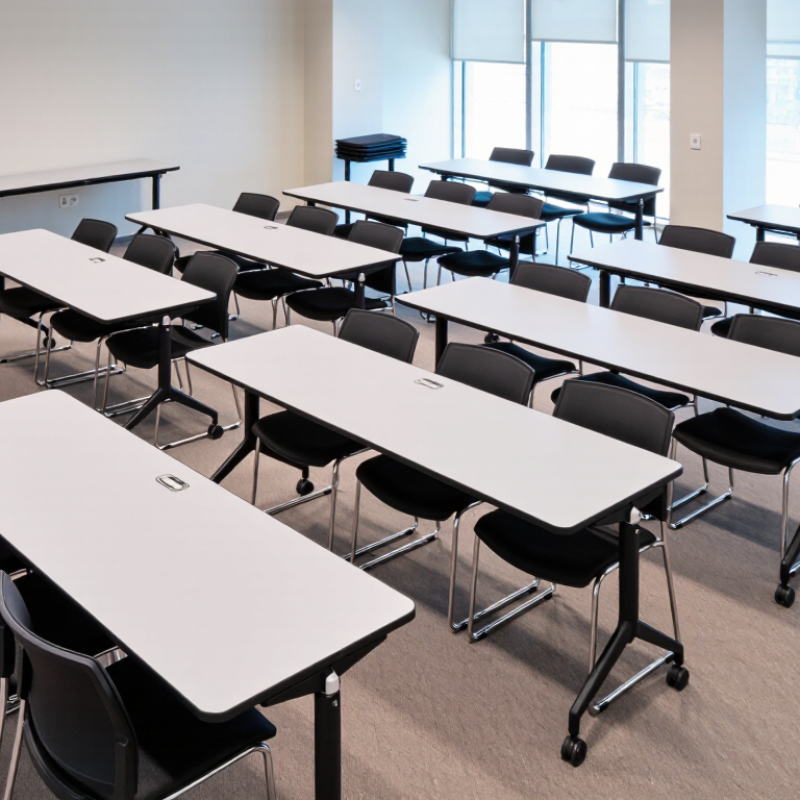
Training-room tables shape how people see, speak, and work together. Rectangular tables suit classroom rows, where each learner needs space for a laptop, notebook, and drink. They are easy to arrange, but long rows can make discussion feel distant. Flip-top tables fold their tops vertically, so staff can clear the room quickly after a session. They work well in shared spaces that host both lessons and events. Nesting tables slide together when not in use, saving floor space in smaller rooms. Check that their wheels lock firmly; a table that drifts during note-taking is distracting.

Modular tables can be joined into clusters, U-shapes, or broad work surfaces. They suit group exercises, though uneven joins may catch papers or cables. Round tables encourage face-to-face discussion and can soften a formal room, but they use floor area less efficiently. For training with frequent layout changes, compare table weight, storage space, and accessible routes—not just the listed dimensions. A practical test helps: place a chair at each side and open a laptop on the surface. Some tables look spacious in a catalogue and feel cramped in use. That detail is easy to miss.

What Are the Best Training Room Tables in 2026? - Common Types of Training Room Tables and Their Uses

Table Type Typical Configuration Best Uses Key Advantages Points to Consider
Rectangular training table Rows facing a presenter; commonly seats 1–2 people per table, depending on table length. Instructor-led classes, note-taking, laptop use, and rooms that need a clear front-facing layout. Simple to arrange, works well in rows, and can be joined to create longer work surfaces. Rows may limit participant interaction; leave clear aisles for access and circulation.
Flip-top table Rectangular top with a hinged mechanism that allows the top to fold vertically for storage. Multi-purpose rooms that regularly switch between training, meetings, and open-floor activities. Can be nested compactly when not in use; many models include casters for easier movement. Check the locking mechanism, folded storage footprint, and safe handling requirements.
Folding table Portable table with legs that fold beneath the top; available in several lengths and widths. Temporary classrooms, event-based training, and spaces with limited storage. Usually quick to set up and take down, with straightforward storage between sessions. Stability, weight, and durability vary by construction; confirm the working-height and load rating.
Trapezoid table Angled sides allow multiple tables to form rows, pods, or larger collaborative shapes. Group exercises, workshop activities, and layouts that alternate between individual and team work. Highly reconfigurable and can support both forward-facing and collaborative arrangements. Plan the room layout in advance; joined configurations need enough space for chairs and walkways.
Seminar table Typically a narrow rectangular surface designed for one participant per table or a compact row. Lecture-style training, exams, and settings where participants need an individual writing surface. Supports orderly seating and can make efficient use of narrow rooms. Smaller work surfaces may be less suitable for large laptops, course materials, or group tasks.
Collaborative pod table Several tables arranged in small clusters, often seating around 4–6 participants per pod. Team-based learning, discussion, project work, and peer instruction. Encourages conversation and makes it easy to distribute group materials. Requires more floor area than straight rows and may make presenter visibility more challenging.
Horseshoe or U-shape layout Rectangular tables arranged around an open center, with participants seated along the outer edge. Demonstrations, instructor-led discussion, presentations, and sessions requiring participant visibility. Provides a clear view of the presenter and supports face-to-face discussion. Uses more room perimeter and may reduce the number of seats compared with rows.
Round or oval table One central surface with participants seated around it; capacity depends on diameter and chair spacing. Small-group discussion, coaching, planning sessions, and collaborative workshops. Creates an inclusive arrangement with no obvious head of the table. Can be less efficient for laptop-heavy training or layouts that need rows facing a screen.

Selection tip: Choose a layout based on the training activity, room dimensions, required equipment, and how often the space needs to be reconfigured. Seating capacity is indicative and depends on table size, chair width, and required aisle clearance.

Key Features to Compare When Choosing a Training Table

What Are the Best Training Room Tables in 2026?
Key Features to Compare When Choosing a Training Table

The best training table depends on how your room is used, not just how it looks in a product photo. Start with the room’s dimensions and the number of people who need clear working space. A 1.2-meter table may suit two trainees, while wider layouts can crowd aisles when chairs are pulled out. Measure with chairs in place. Small details matter.

Compare table size, shape, and flexibility. Rectangular tops are easy to arrange in rows, while curved or trapezoidal tables can support group work. Folding legs and nesting designs make storage easier, but check that the locking parts feel secure and the tables move without scraping the floor. Stability matters. Look at surface resistance to scratches, spills, and frequent cleaning, especially in busy rooms. Check edge finish and frame joints, too; these details can reveal how well a table may hold up over time. If laptops are common, consider cable access and nearby power, without letting cords cross walkways. It is easy to overvalue mobility and overlook wobble. Try a sample setup if possible, then reconsider whether the room still feels comfortable when occupied.

How to Match Table Design to Room Size and Training Needs

Choosing training room tables starts with the room, not the catalog. Measure usable floor area after accounting for doors, columns, screens, and storage. Then mark chair positions and walking routes with tape. Leave clear paths. Participants should be able to enter, turn, and sit without shifting neighboring chairs. Long rectangular tables suit lecture-style sessions, but they can make group work feel distant. Small trapezoid or modular tables are easier to rearrange for teams. Yet more joints can mean extra setup time and uneven gaps. A scaled floor plan helps, though it may not show the awkward corner beside a door.

Match the table shape and surface to how people learn. For laptop-heavy instruction, allow enough depth for a screen, notebook, and water bottle. Power access matters; cords crossing walkways create clutter and trip risks. Shared exercises benefit from tables that connect into pods, while exams and demonstrations often need forward-facing rows. Keep sightlines open to the trainer and display. Check legroom, edge comfort, and whether tables can pass through the doorway before ordering. These details are easy to overlook. One compromise remains: a compact layout may fit more seats, but participants still need room to move and reset between activities.

Best Training Room Table Layouts for a 600 sq ft Room

Estimated attendee capacity by layout, using planning allowances of 20 sq ft per person for classroom rows, 25 for boardroom and collaborative pods, and 30 for a U-shape. These are planning estimates, not fixed occupancy limits; circulation, accessibility, and equipment can change the final capacity.

Classroom rows suit presentation-led sessions and maximize seats. Boardroom tables support discussion, while U-shaped layouts improve face-to-face interaction with fewer seats. Collaborative pods work well for small-group activities.

What to Look for in a Training Room Table in 2026

A training room table should fit the way people learn, not just the floor plan. Measure the room with chairs pulled out, then leave clear paths between seats. A layout that looks roomy on paper can feel cramped once laptops, notebooks, and coffee cups arrive. Small details matter.

Choose a surface that resists everyday scratches and cleans without special products. Check the frame for wobble, especially if people will write by hand or lean on the edge. Rounded corners can make crowded walkways less awkward. For regular room changes, lockable casters help, but test them on the actual floor; some roll poorly on thick carpet. Test it in person.

Think through power and connectivity before choosing a shape. Shared outlets should be reachable without cables crossing walking routes, and table edges need enough space for notebooks beside open laptops. Modular tables can adapt to different class sizes, though extra joints may make the setup feel less solid. I have seen teams focus on flexibility and overlook storage for spare chairs. That is an easy miss. If possible, arrange a trial setup with the room’s usual equipment and ask both instructors and learners what feels inconvenient. Their feedback may challenge the original plan.