What Are the Top 10 Best Standing Desk Converters?
Choosing among the top 10 best standing desk converters is not simply a matter of picking the tallest model. A useful converter should fit your desk, monitor, keyboard, and daily working habits. It should rise smoothly, remain stable, and leave enough room for natural wrist movement. These details matter when you alternate between sitting and standing for several hours.
Ergonomist Dr. Alan Hedge often advised, “The best posture is the next posture.” That principle guides this comparison. The best standing desk converters encourage frequent position changes rather than forcing you to stand continuously. Our evaluation considers height range, adjustment effort, platform space, weight capacity, keyboard comfort, and long-term build quality. We also examine practical issues, such as whether a large monitor makes the converter wobble or whether its lowest setting still feels too high.
Small differences become obvious.
A converter may look excellent online but feel cramped beside a notebook and mouse. Another may lift easily but consume half a compact desk. Some models advertise impressive weight limits, yet their surfaces flex under pressure. That is worth questioning. No single design suits every worker, and even a highly rated product can disappoint in a poorly matched workspace. The selections below balance measured specifications, user feedback, ergonomic guidance, and realistic office use. They are intended to support a better decision, not promise a perfect posture or effortless productivity.
What Is a Standing Desk Converter and How Does It Work?
What Are the Top 10 Best Standing Desk Converters?
A standing desk converter is a height-adjustable platform placed on an existing desk. It lifts your monitor, keyboard, and mouse without replacing the entire workstation. Most models use a spring, electric motor, or manual handle. The mechanism should rise smoothly and remain stable at chest-level typing height.
In daily use, the change is simple. I lower the platform for seated work, then raise it until my elbows form roughly a 90-degree angle. My screen stays near eye level, while my shoulders remain relaxed. It feels practical, not magical. The 2019 Cochrane review of 24 workplace studies found sit-stand desks reduced sitting by about 77 minutes per workday, although the evidence quality was low. That limitation matters.
A converter works best when movement is varied. Standing still for hours can create foot, calf, or lower-back discomfort. The Occupational Safety and Health Administration recommends neutral wrist positions, supported feet, and monitor placement that limits neck bending. A 2018 BMJ trial also reported about 83 fewer sitting minutes daily after a workplace sit-stand intervention. However, that result came from a structured program, not furniture alone. My own first mistake was raising the desk too high and ignoring the keyboard angle. Small adjustments made the difference. A soft floor mat, brief walking breaks, and alternating positions may improve comfort, but individual needs still vary.
Which Features Define a High-Quality Standing Desk Converter?
When comparing the top 10 standing desk converters, adjustability matters more than appearance. A high-quality model should lift smoothly and remain stable at standing height. It should also provide enough depth for a keyboard, mouse, and monitor. Wobbling is distracting. OSHA’s Computer Workstations eTool recommends keeping the monitor near eye level, with wrists neutral and feet supported. These details protect comfort during long work sessions.
The mechanism should allow frequent position changes without excessive force. A 2018 Cochrane review found sit-stand workstations reduced workplace sitting by about 77 minutes per day in the short term. That result is encouraging, but it does not guarantee better posture. The converter needs a broad base, reliable locking points, and a height range suited to the user. Cable management also matters. Loose cables can catch on the keyboard or pull the monitor forward.
Tips: Test the converter with your actual equipment. Place your monitor at eye level, then check whether your elbows stay close to 90 degrees. Move between sitting and standing every 30 to 60 minutes. Do not stand rigidly all day. A softer mat may reduce foot fatigue, although personal comfort still varies. A small flaw remains: many products advertise weight capacity without explaining stability at maximum height. That specification deserves closer inspection.
What Are the Top 10 Best Standing Desk Converters?
The chart ranks the features that most strongly define a high-quality standing desk converter. Scores represent the feature’s weight in an editorial quality benchmark, with a total of 100 points.
Height range and stability receive the greatest weighting because they directly affect posture, usability, and safety. Smooth adjustment, ergonomic keyboard positioning, load capacity, and durable construction are also essential for daily use.
How Do the Top 10 Standing Desk Converters Compare?
When comparing the top 10 standing desk converters, height range matters more than appearance. A suitable unit should raise the keyboard near elbow level while keeping the monitor close to eye height. The best-performing designs usually offer smooth adjustment, firm platforms, and enough depth for a keyboard and mouse. Weight capacity also deserves attention. A converter that wobbles during typing becomes frustrating quickly.
Ergonomic evidence supports changing posture, not standing all day. A 2019 Cochrane Review found sit-stand desks reduced workplace sitting by about 1.1 hours per workday, although the evidence quality was limited. That uncertainty matters. The top ten should therefore be compared by movement support, not marketing claims. Models with broad bases feel steadier, while compact units suit shallow desks but may restrict screen placement. Manual systems can be reliable. Electric systems are easier to adjust, but add noise, cables, and failure points.
Testing should include typing, screen stability, adjustment speed, and edge comfort. OSHA’s computer workstation guidance emphasizes neutral wrists, relaxed shoulders, and proper monitor positioning. In practical use, a converter that reaches standing height but leaves the screen too low is only partly successful. I would also check the lowest setting carefully. Some units sit too high for shorter users, a weakness that product photos rarely reveal. Better comparisons include real measurements, long-session observations, and user height data, not just star ratings.
Which Standing Desk Converter Fits Different Workspaces and Needs?
Choosing among the top 10 standing desk converters depends on your workspace, not popularity alone. A compact desktop model suits a small apartment or shared office. Look for a narrow base, smooth height adjustment, and enough room for your keyboard and mouse. Measure twice. A converter that overhangs the desk can feel unstable.
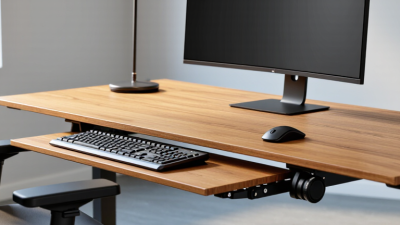
For dual monitors, choose a wide platform with strong weight support and a stable lifting mechanism. A separate keyboard tray may improve wrist position, especially when the screens sit higher.
Manual converters usually cost less and work well for occasional standing. Electric models suit users who change positions throughout the day. Check the lowest and highest settings against your seated posture.
I once chose a converter that looked spacious but left no room for paperwork. That mistake changed how I compare products. I now check desktop depth, cable clearance, and the distance between the screen and my eyes. A laptop user may prefer an integrated riser with ventilation space. A heavy monitor setup needs a tested load rating, not a vague promise. Anti-slip feet help, but they cannot fix an uneven desk. Think about movement, too. Even a well-designed converter may feel tiring if standing time increases too quickly. Different bodies need different adjustments.
What Should You Consider Before Choosing a Standing Desk Converter?
Before choosing a standing desk converter, measure your current workstation.
The platform should lift your monitor near eye level while keeping your elbows around 90 degrees.
OSHA’s Computer Workstations eTool recommends neutral wrists, supported feet, and a screen positioned to reduce neck bending.
A converter that rises too little may leave you hunching. One that rises too high can strain your shoulders.
Small details matter.
Check the converter’s height range, keyboard space, weight capacity, movement, and base stability.
The Cochrane Database of Systematic Reviews examined workplace sitting interventions and found sit-stand desks reduced sitting by roughly
84 to 116 minutes daily in short-term studies.
Longer-term reductions were smaller, often near 30 to 45 minutes.
Standing is not automatically healthier. Alternating positions matters more.
Use a timer, change posture, and keep walking breaks.
A wide platform suits two screens, but it may consume valuable desk depth.
A compact model saves space, yet may force a cramped keyboard angle.
Test the seated position first. Then check the standing position.
I would not treat the first comfortable setup as proof of good ergonomics.
After several hours, wrist pressure, foot fatigue, or monitor glare may reveal problems.
The National Institute for Occupational Safety and Health also emphasizes workstation adjustment and task variation, not one fixed posture.
That advice is easy to overlook.
A stable converter should support real work, not merely look adjustable.